
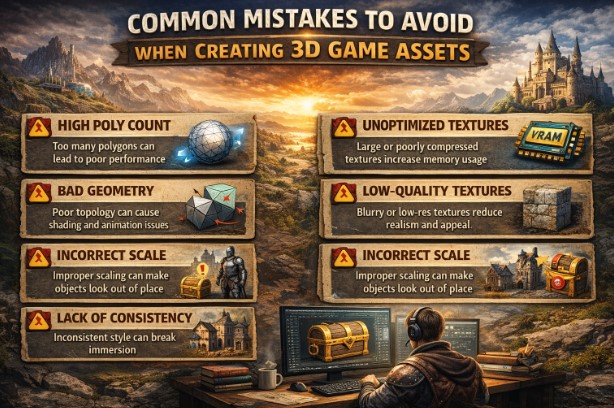
Perhaps one of the most challenging parts in game development is creating both visually appealing and technically sound content for the games themselves. While strong concepts and creative ideas are important, more often than not, proper execution decides whether a game feels either polished or unfinished.
The majority of projects struggle not because ideas are poor but rather because avoidable mistakes creep in during production. Lying at the heart of this process are 3D game assets, which directly influence performance, realism, and overall gameplay quality.
Below are some of the most common mistakes developers make in building assets—and how avoiding those things drives better outcomes.
Ignoring Performance Constraints Early
Commonly, one of the biggest mistakes in asset creation is to focus wholly on the visual detail without regard to performance. Greatly detailed models with over-inflated polygon counts and oversized textures look great in isolation, but very quickly overwhelm the game engine.
Common performance-related issues include:
- Frame rate drops while playing
- Long loading times
- Memory spikes leading to crashes
Performance needs to be optimized within the asset pipeline, rather than an afterthought. It goes without saying that assets should balance out visual quality with technical efficiency for smooth gameplay across platforms.
Inconsistent Art Style
Other common issues include inconsistent art direction for projects created with multiple artists or outsourced. If assets differ in style, scale, or material quality, then the world of the game appears fragmented and unprofessional.
This often occurs when:
- Ambiguities or inconsistencies in style guides
- Assets are created without visual references.
- External contributors do not share the same core vision.
Immersion requires consistency in shapes, proportions, textures, and lighting response. Assets can be super detailed yet still look wrong because they don’t fit with the overall art direction.
Poor Topology and Mesh Structure
Poor topology is an engineering error that might create long-term problems. Assets with messy geometry, extra edge loops, or poor polygon distribution will be painful to animate, optimize, and modify.
Poor topology can lead to:
- Animation issues and deformation errors
- Difficulties with level-of-detail creation
- Higher performance costs
Clean, purposeful mesh structure ensures that assets remain flexible and production-friendly during development.
Overlooking Gameplay Readability
Assets are more than just visuals-they define how a player perceives and acts within the game. Perhaps the most common pitfall to fall into is creating assets that may look good but do not clearly and concisely describe the information for gameplay.
Examples include:
- Enemies that blend into environments
- Interactive objects that are hard to identify
- Visual clutter during action that confuses players
In the heat of gameplay, 3D game assets should support clarity and never hinder it. Clear silhouettes, contrast, and thoughtful design decisions enable players to quickly and confidently take action.
Neglecting Scale and Proportion
Improper scale is a subtle yet crippling problem. Assets can be too big or too tiny, too inconsistent with the game world to instantly shatter immersion.
Scaling problems normally occur when:
- No engine testing creates the assets.
- Real-world references are ignored.
- Many artists operate without shared measurements.
Correct scale enhances realism, quality of animation, and player navigation, especially in first-person and third-person type games.
Poor Practices in Texture
Textures play a huge role in how assets appear on screen. Common mistakes include having large texture sizes, inconsistent resolution, or low-quality texture maps that don’t respond well to lighting.
Texture-related problems may cause:
- Blurry or pixelated visuals
- Unnecessary memory consumption
- Inconsistent lighting across assets
Efficient texture workflows help maintain visual quality without sacrificing performance.
Failing to Plan for Reusability
So many projects suffer from the limitation of designing assets for single-use purposes only. This limits flexibility when new content is needed, increasing production time.
Reusable assets:
- Lowering Development Costs
- Speed up level creation
- Maintain visual consistency
Poor Naming and Organization
Disorganized asset libraries are slowing down production way more than most teams think. Poor naming conventions, missing folders, and inconsistent file structures create confusion and errors.
This often results in:
- Wasted time searching for assets
- Accidental duplication
- Integration errors in the engine
Clear naming systems and organized pipelines support team efficiency by reducing technical debt.
Skipping Engine Testing
Assets that look perfectly fine in a modeling tool may behave very differently inside an engine. The critical mistake is skipping regular engine testing.
Without testing, developers can miss:
- Shading and Lighting Issues
- Scale or collision problems
- Performance Bottlenecks
Underestimating the Value of Expertise
Lacking this expertise in-house, studios often rely on collaboration with a professional 3D visualization company to avoid costly mistakes by ensuring that the created assets meet both the artistic and technical standards.
Conclusion
Every decision pertaining to clean topology and gameplay clarity affects performance optimization and art direction. Developers should, therefore, plan carefully and maintain good workflows to make sure that 3D game assets act to support realism, performance, and engaging gameplay rather than be a source of technical problems.
